GuruPremium
HTMLCSSJS

Prism One: exploding product scroll

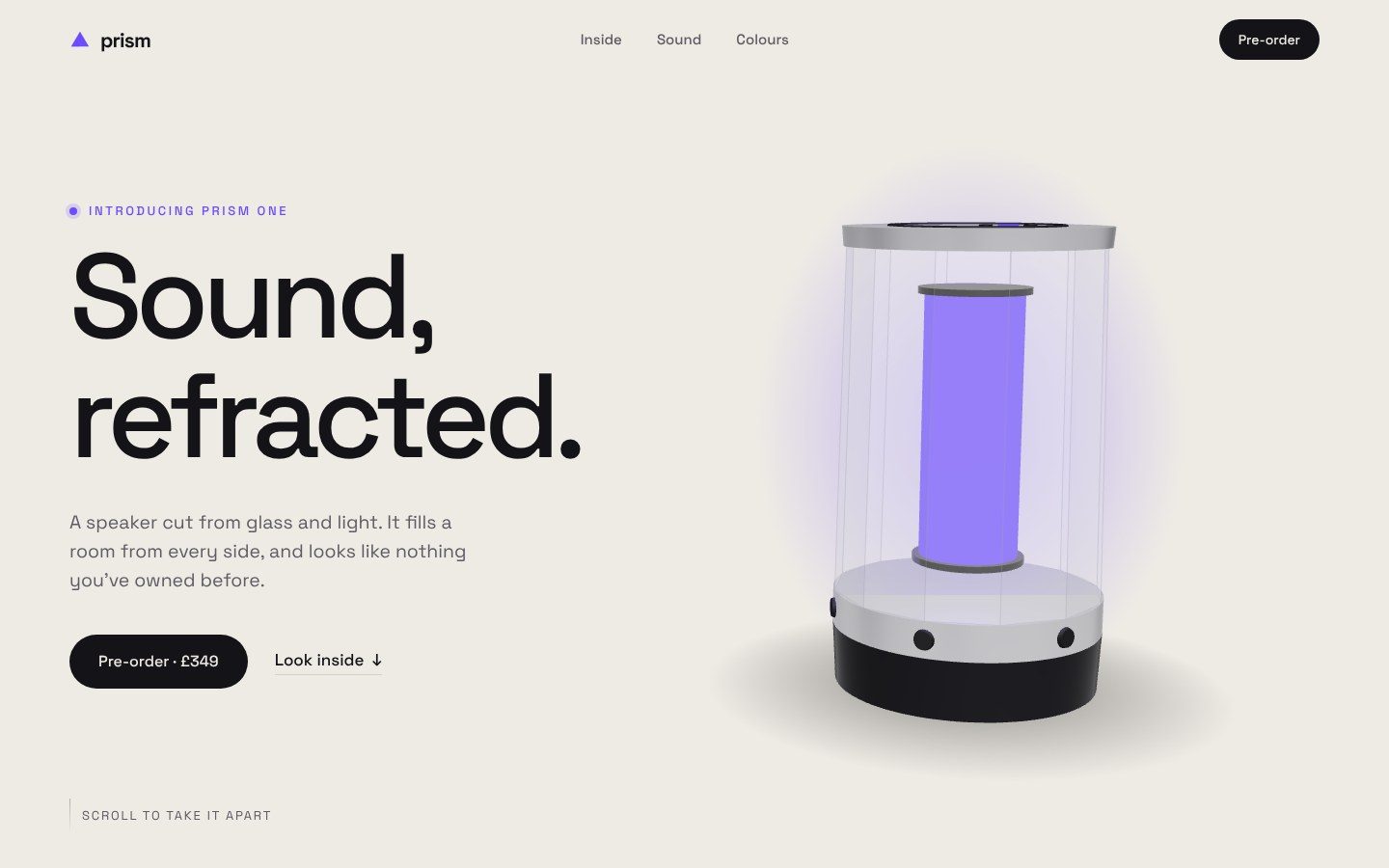
A launch page for a glass speaker. Build the speaker in Three.js from simple shapes, then pull it apart layer by layer, ripple sound out of it and recolour its core as you scroll.

The brief

Your challenge is to build this launch page for Prism One, a glass speaker, and get it as close to the designs as you can.

Prism Audio is a small London studio launching its first product: a speaker with a faceted glass body and a glowing core. The page has one job: make people want to see inside it, then pre-order.

This is a Guru challenge. Apple-style product pages like this are some of the best-paid front-end work there is, and you'll build the whole product in code. No 3D models, no photos.

Your job

Build the speaker in Three.js from simple shapes, and make scroll take it apart, play it and put it back together.

User stories

Visitors can:

  • See the speaker turning slowly next to the headline as soon as the page loads
  • Scroll to pull the speaker apart into five labelled layers, and scroll back to rebuild it
  • Watch sound ripple out from the speaker in the 360Β° section
  • Pick one of three core colours and see the speaker's light change
  • Pre-order, with the button showing the colour they picked
  • Use the whole page with a keyboard, and read it all without the 3D scene

What to build

The speaker, fixed behind the page, made from five layers stacked on top of each other:

  1. Crown: a brushed aluminium top plate with three touch points
  2. Lens: a twelve-sided glass shell with fine lines on its edges
  3. Core: a glowing column with a soft halo and a coloured light
  4. Ring: an aluminium band with six small tweeters facing outwards
  5. Base: a graphite drum with a soft shadow on the floor

Five scroll scenes, one per section. The speaker moves smoothly between them:

  1. Hero: speaker on the right, headline on the left
  2. Inside: the layers pull apart, each with a label and a line that follows it
  3. 360Β° sound: speaker on the left, leaning towards you, with rings rippling out from it
  4. Colours: speaker centred above a colour picker (Ultraviolet, Ember, Lagoon)
  5. Pre-order: speaker back together on the right, price and button on the left

On phones the speaker sits above each section's text and the labels are hidden.

RulesPart of Pro
You're done when8 checks your build has to pass
BonusPart of Pro
TipsPart of Pro

What you get with Pro

  • 15design stillsEvery screen size and scroll scene, at full resolutionπŸ”’
  • 1starter packREADME, content, fonts, libraries and an AI mentor file for your levelπŸ”’
  • 1design fileColours, type, spacing and motion values as tokensπŸ”’
  • 1finished solutionOur production code to compare with yours, once you’ve had a goπŸ”’
  • ∞AI code reviewsScores and line-by-line fixes on every version you submitπŸ”’

Skills you’ll practise

Three.jsWebGLGSAPScrollProduct page
  1. Make each layer its own group with a "home" position, then explode by adding an offset times one number
  2. Drive every pose from one scroll number (which section you are on, as a decimal) and smooth it
  3. Place the HTML labels by projecting each layer's 3D position to the screen with vector.project(camera)

Premium challenge

Build this one with Pro.

Every premium challenge, every file above, and an AI review on every build. From Β£10 a month, cancel anytime.